
How to Edit a PDF Online for Free
Edit existing PDF text, add new text, change formatting and download your document with the free PdfWord editor in your browser.
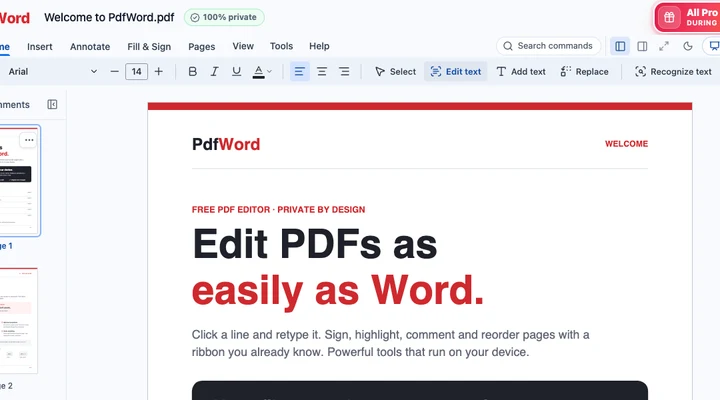
Use PdfWord to fix a typo, update a date or add a line of text to a PDF. The basic editor opens and saves PDFs in your browser without requiring an account.
Change text already on a page
- Open the PDF editor and choose File → Open PDF or pictures, or drop your PDF into the editor. Enter the opening password if the file asks for one.
- Choose Home → Edit text. Click a line and type the replacement.
- Use the Home toolbar to adjust the font, size, color, alignment, bold, italic or underline. Click away to see how the edited line fits.
- Select File → Download PDF. Open the saved copy and check the edited page at normal zoom.
Add new text anywhere
Choose Home → Add text, click where the text belongs and type. Use Select to reposition the text box. This is handy for a missing name on a form or a short note in a blank margin. To replace the same phrase throughout a document, use Find and replace.
When the page is a scan
If you cannot select the words, the page may be a picture. Recognize the text with OCR first, and review the recognized words before editing. Editing original text can use a substitute font, and affected pages may be flattened on export. Check text selection on the downloaded copy if recipients need to copy or search its contents.